posting pictures

I have posted pictures of items i have sold on the GB site with no problems.
I can't for the life of me figure out how to post a picture on the forum side.
When i did search for help it led me down several dark alleys.
I don't believe I'm that dense but i could be.
Please help!
-

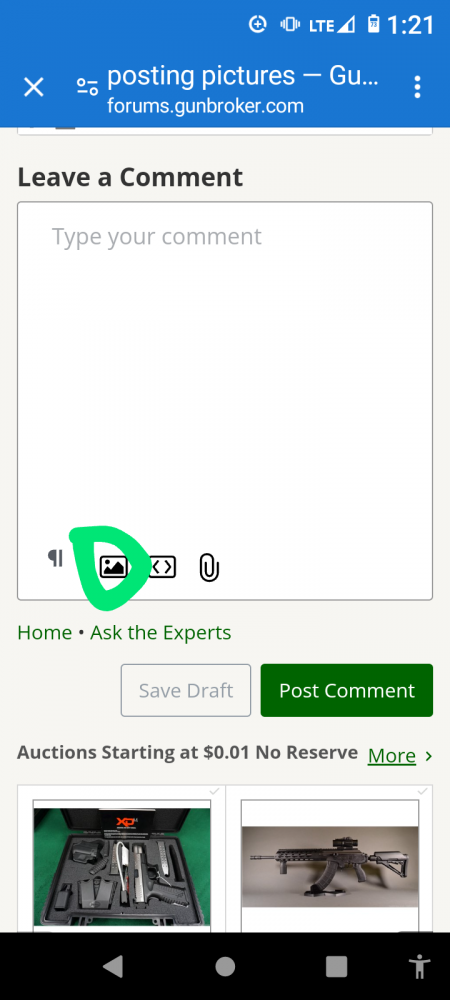
You just hit the little icon that looks like a picture. Choose your picture. Wait. Post comment. I hope that helps.
 6
6 -

You can also do a simple 'copy and paste'. Move the cursor over the photo, right click, then click 'copy'. Now go to where you want to put the picture, right click, then click 'paste'.
You can do the same thing using 'CTRL C' to copy and 'CTRL V' to paste.
6 -

Not all clients (Browsers and OS on the device) play nice with all Web servers (the GB Forum software) The copy n paste may not work but the icon as shown in Rae's post should, other wise try a different Browser and/or device combination. Good luck!
6 -

NeoBlackdog: 29953473697307/comments/29953458021147
You can also do a simple 'copy and paste'. Move the cursor over the photo, right click, then click 'copy'. Now go to where you want to put the picture, right click, then click 'paste'.
You can do the same thing using 'CTRL C' to copy and 'CTRL V' to paste.
And once you master that......yout too can be a Harvard president!! 😁
Just sayin'
9
Please sign in to leave a comment.
Comments
4 comments